XML sitemap best practices: what to include and what to leave out
By ElixRank Team · Updated
Short answer
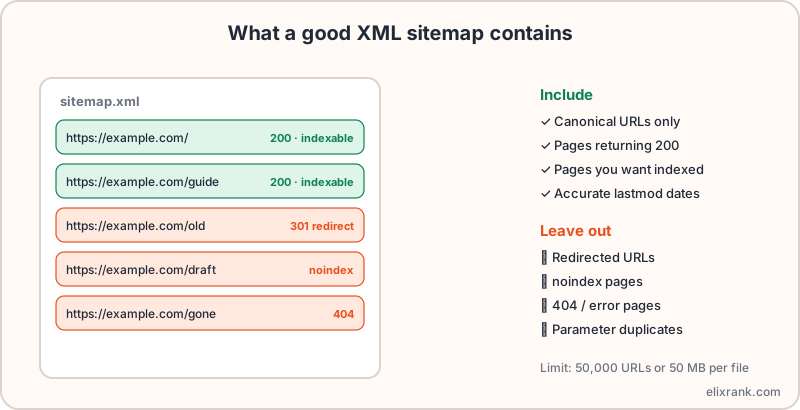
An XML sitemap lists the URLs you want search engines to crawl and index. Include only canonical, indexable pages that return a 200 status; leave out redirects, noindex pages and errors. Each file may hold up to 50,000 URLs or 50 MB uncompressed, and accurate lastmod dates help crawlers prioritise.
What a sitemap does and doesn't do
A sitemap is a file listing the pages you consider important, so crawlers can find them. It helps discovery, especially for new or poorly linked pages, but it does not guarantee a page is crawled, indexed or ranked.
What to include
- Canonical URLs only, in the exact form you want indexed (https, with or without www, consistent trailing slashes).
- Pages that return a 200 status.
- Pages you want in search results.
- A lastmod date that changes only when the page meaningfully changes.
What to leave out
- URLs that redirect. List the destination instead.
- Pages with a noindex tag.
- 404 and other error pages.
- Parameter and filter duplicates.
- Pages blocked in robots.txt.
Listing redirected or broken URLs wastes crawl effort and sends mixed signals. A quick audit with the sitemap validator flags broken and redirected entries, and the sitemap URL extractor lists every URL so you can check them in bulk.
Limits, index files and fields
- One file can hold up to 50,000 URLs or 50 MB uncompressed.
- Beyond that, split into several files and list them in a sitemap index file.
- Google says it ignores the priority and changefreq fields; lastmod is useful when accurate.
- Use absolute URLs with the protocol.
Submit and reference it
- Host the file on your site, usually at /sitemap.xml.
- Add a line to robots.txt: Sitemap: https://example.com/sitemap.xml. See how robots.txt works.
- Submit it in Google Search Console under Sitemaps.
- Check the report for 'Couldn't fetch' and errors, and compare discovered URLs with what you expect.
Common sitemap errors
- Sitemap returns HTML or a redirect instead of XML.
- URLs on a different host than the sitemap.
- Hundreds of redirected or noindex URLs after a migration.
- Stale lastmod dates that change on every build, which teaches crawlers to ignore them.
After fixing, link your key pages well too: sitemaps help discovery, but internal links tell search engines what matters.
Frequently asked questions
What should be in an XML sitemap?
Canonical, indexable URLs that return a 200 status and that you want in search results.
How many URLs can a sitemap have?
Up to 50,000 URLs or 50 MB uncompressed per file. Use a sitemap index for more.
Does a sitemap guarantee indexing?
No. It helps discovery, but Google decides what to crawl and index.
Do priority and changefreq matter?
Google has said it ignores them. An accurate lastmod can still be helpful.
Validate your sitemap now
Find redirected, broken and noindex URLs with the free sitemap validator.
Try ElixRank free →