Keyword cannibalization: how to find and fix it
By ElixRank Team · Updated
Short answer
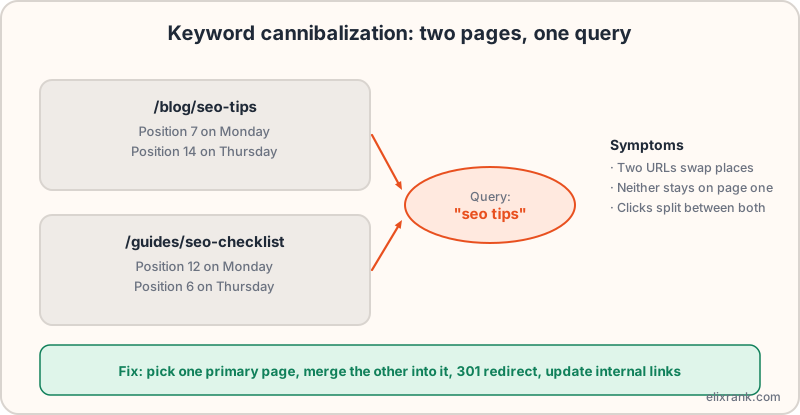
Keyword cannibalization is when two or more pages on the same site compete for the same search query, so Google swaps between them and neither ranks as well as one strong page would. You find it in Google Search Console by filtering to a query and checking the Pages tab, and fix it by merging, differentiating or redirecting.
What cannibalization looks like
Google generally wants to show one result per site for a query, so when several of your pages target the same intent, it has to choose. It may choose differently on different days, or keep rotating between them.
How to find it in Search Console
- Open Performance → Search results and set a date range of at least 3 months.
- Sort the Queries tab by impressions and pick an important query.
- Click the query to filter, then open the Pages tab.
- If two or more pages show meaningful impressions for the same query, look at them.
- Add the Date dimension for each page to see whether they swap positions over time.
Do this for your top 20 to 30 queries rather than all of them. ElixRank can surface queries with several competing pages directly from the same data.
Why it happens
- Several posts written on the same topic over the years.
- A landing page and a blog post targeting the same commercial query.
- Tag, category or filter pages that duplicate content.
- Near-duplicate templates, such as one page per city with almost identical text.
Four ways to fix it
1. Merge and 301 redirect
Pick the stronger page as the primary. Move any useful content from the weaker page into it, then 301 redirect the old URL. Verify with the redirect checker that it is a single clean hop.
2. Differentiate the intent
If both pages deserve to exist, make them serve different intents: for example, one guide that explains the topic and one page that compares options. Retitle and rewrite so each clearly targets a different query.
3. Use a canonical for true duplicates
If a page is a near-duplicate that must stay live, point its canonical tag at the primary page. A canonical is a hint, not a command.
4. Fix the internal links
Link to the primary page with descriptive anchor text from related pages, and stop linking to the weaker one with the same anchor. See internal linking for SEO.
After you fix it
- Update the sitemap so it lists only the surviving URL. Check it with the sitemap validator.
- Wait 2–4 weeks and compare the query's position and clicks.
- Note the change and date so you can judge the result.
Frequently asked questions
What is keyword cannibalization?
Several pages on one site competing for the same query, so rankings are unstable and clicks are split.
Is cannibalization always bad?
No. Two results from one site can both do well. It is a problem when positions swing and neither page ranks as well as a single strong page would.
How do I fix it?
Merge the pages and 301 redirect, differentiate their intent, use a canonical for duplicates, and fix the internal links.
Can I find it for free?
Yes, in Google Search Console by filtering a query and viewing the Pages tab.
Find pages competing with each other
Connect Search Console and ElixRank flags queries where several of your pages compete.
Try ElixRank free →