Internal linking for SEO: a practical guide
By ElixRank Team · Updated
Short answer
Internal links connect your pages to each other. Good internal linking helps search engines find and understand pages and passes visibility from strong pages to weaker ones. Use a hub-and-spoke structure, descriptive anchor text, and make sure every important page is linked from at least one crawlable page.
Why internal links matter
- Discovery: crawlers find new pages by following links.
- Context: anchor text tells search engines and readers what the target page is about.
- Emphasis: pages that many relevant pages link to are signalled as important.
- Navigation: readers find related content and stay longer.
Unlike backlinks, internal links are entirely under your control, which makes them one of the cheapest ways to improve how a site is understood.
Structure: hubs and spokes
A hub page covers a broad topic and links out to detailed spoke pages. Each spoke links back to the hub and to closely related spokes.
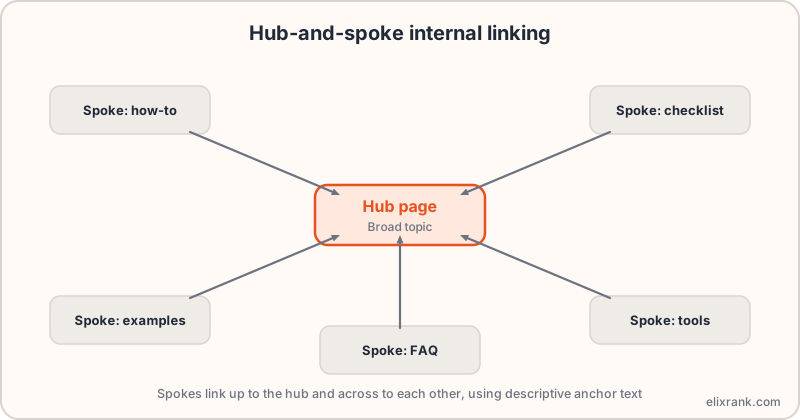
This keeps related content together, makes the topic clear and avoids isolated pages. For example, a guide on Search Console metrics can link to separate pages on striking distance keywords and CTR.
Anchor text that works
- Be descriptive: 'sitemap validator' beats 'click here'.
- Match the target page's topic, with natural variation.
- Don't use the identical anchor for two different pages.
- Keep links inside the body where they fit the sentence, not only in menus and footers.
Fix orphan pages first
An orphan page has no internal links pointing to it. Crawlers may never find it, and even if listed in the sitemap it gets little context. Compare your sitemap URLs with the pages that actually receive internal links, then add links from relevant pages.
Use the sitemap URL extractor to list every URL in your sitemap as a starting point.
Which pages should link out first
- Pages that already get the most traffic and impressions.
- Pages on the same topic as the page you want to lift.
- Newly published pages that need to be discovered.
Prioritise linking to pages that sit near page one. These are the striking distance candidates where a boost has the best chance of mattering.
Common mistakes
- Links that only exist after JavaScript runs and aren't real anchor tags.
- Linking to URLs that redirect, which wastes crawl effort. Check with the redirect checker.
- Linking to noindex or blocked pages.
- Hundreds of links in one block of copy, which dilutes each one.
- Never updating old posts to link to new ones.
Frequently asked questions
What is internal linking in SEO?
Links from one page of your site to another. They help search engines find and understand pages and distribute visibility.
How many internal links should a page have?
There is no fixed number. Link where it genuinely helps the reader and keep anchor text descriptive.
What is an orphan page?
A page with no internal links pointing to it, which makes it hard for crawlers and readers to find.
Do internal links help rankings?
They help search engines discover and understand pages, which supports rankings, but they are not a guarantee on their own.
Know which pages to link to first
ElixRank ranks the pages closest to page one so your links go where they count.
Try ElixRank free →