Google Search Console metrics explained
By ElixRank Team · Updated
Short answer
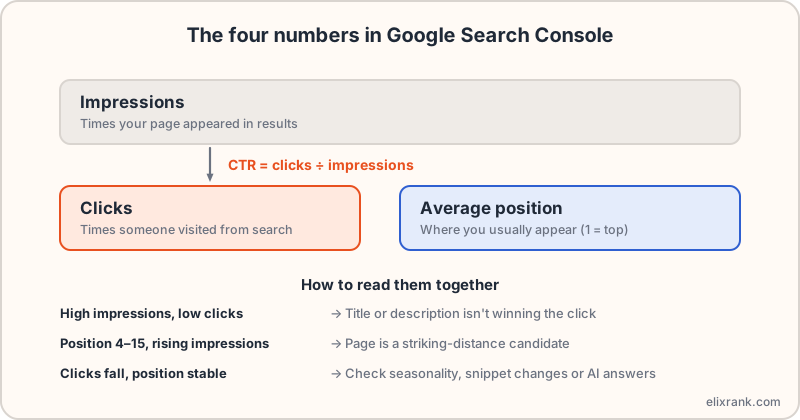
Google Search Console reports four main numbers: impressions (times your page was shown), clicks (times someone visited from Google Search), click-through rate (clicks divided by impressions) and average position (where you typically appeared, with 1 at the top). Read them together, by query and by page, not alone.
The four numbers
Impressions
An impression is counted when a link to your site appears in a search result that a person could see. It does not mean they read it, and a result a long way down the page can still count. Google documents the exact rules, which differ slightly between result types.
Clicks
A click is a visit from a Google Search result to your site. It does not include direct visits, email or social traffic, so it will not match Google Analytics.
CTR (click-through rate)
CTR is clicks divided by impressions, shown as a percentage. 50 clicks from 1,000 impressions is a 5% CTR. It depends heavily on position and on the type of query.
Average position
Average position is the average of the highest position your site held for the query or page each time it appeared. Position 1 is the top. It is an average, so one figure can hide wide swings.
How to read them together
- High impressions, low clicks: the page is shown but the snippet isn't winning. Improve the title and description.
- Position 4–15 with growing impressions: a striking distance candidate.
- Clicks falling while position is stable: check seasonality, a changed snippet, or an AI answer taking the click.
- Position improving but clicks flat: the extra visibility may be on low-volume queries, or the snippet needs work.
Always look by query and by page. A site-wide average blends brand queries (high CTR) with everything else and says very little.
What Search Console can't tell you
- Some rare queries are anonymised, so totals can exceed the rows you can see.
- Data is kept for about 16 months, so export anything you need long term.
- Data appears with a delay of a couple of days and isn't backfilled before verification.
- AI feature traffic is counted within overall Web search data, so it can't be isolated in a separate report.
A simple monthly routine
- Compare the last 28 days with the previous period, by page.
- List pages with falling clicks and check their top queries.
- List queries at positions 4–15 with the most impressions.
- List pages with high impressions and below-normal CTR.
- Pick the top three fixes and note the date for each.
ElixRank automates steps 2–4 and returns a ranked list. Ask it in plain English from your connected data.
Frequently asked questions
What is a good CTR in Search Console?
There is no single good number. CTR varies by position and query type, so compare pages at similar positions on your own site.
Why do my clicks differ from Google Analytics?
Search Console counts clicks from Google Search only. Analytics counts sessions from all sources and handles consent and filters differently.
Is average position accurate?
It is accurate as an average across impressions, but it can hide large swings between devices, locations and days.
How far back does Search Console data go?
About 16 months in the Performance report.
Have your data explained
Connect Search Console read-only and ask what your numbers mean.
Try ElixRank free →