Striking distance keywords: how to find and fix them
By ElixRank Team · Updated
Short answer
Striking distance keywords are queries your site already ranks for, usually around positions 4–15, where a focused improvement can plausibly move the page onto page one or into the top few results. You find them in Google Search Console by filtering queries by average position and sorting by impressions.
What striking distance keywords are
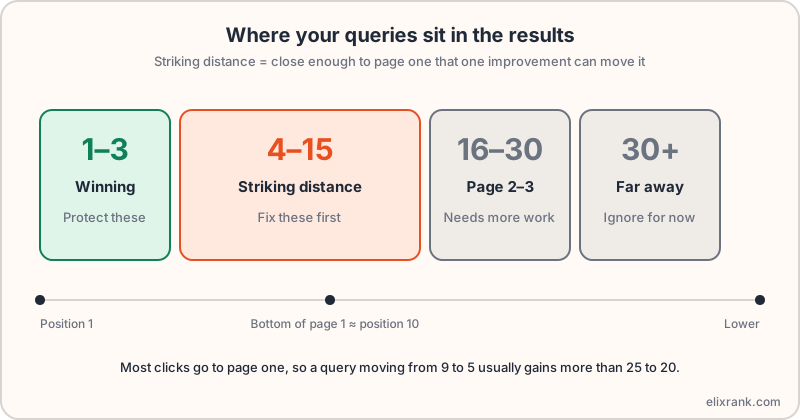
A striking distance keyword is a search query where your page already appears, but not high enough to collect many clicks. The usual working range is average position 4 to 15: below the top three results, but close to or just beyond the bottom of page one.
They matter because Google has already decided your page is relevant. You are not starting from nothing, and you are not trying to win a brand-new topic against sites that have invested for years. You are nudging something that already works.
Why they are usually the cheapest gains
Clicks are concentrated at the top of page one. Moving from position 9 to position 5 typically gains more traffic than moving from position 25 to position 20, even though both are a similar number of places.
- The page is already indexed and considered relevant.
- You can improve what exists instead of writing from scratch.
- Impressions show real demand, so you are not guessing at search volume.
- Changes are small and fast to ship, so you learn quickly what works.
There is no guarantee a change will move a page. Rankings depend on competitors, intent and Google's own systems. What you can say is that this is where effort has the best expected return.
How to find them in Google Search Console
- Open Search Console and go to Performance → Search results.
- Set the date range to at least the last 3 months so one noisy week doesn't mislead you.
- Turn on Average position and Impressions, then open the Queries tab.
- Add a filter for position greater than 3 and less than 16 (use the position filter).
- Sort by Impressions, descending. The top rows are your best candidates.
- Click a query, then the Pages tab, to see which page ranks for it.
Doing this by hand works, but the filters reset and the list is long. ElixRank reads the same Search Console data and returns the ranked list for you; the striking distance keywords tool is the quickest way to see yours.
Five fixes that tend to move them
1. Answer the query more directly
Check what the top results do. If they open with a clear answer and your page opens with a long introduction, move the answer to the top and add a section whose heading matches the query.
2. Rewrite the title and description
A snippet that matches the query wording can raise clicks even if the position doesn't change. Check lengths with the meta length checker.
3. Add internal links from stronger pages
Link to the page from related pages that already get traffic, using descriptive anchor text that includes the topic.
4. Fill the content gaps
Compare your headings with the pages above you. Add missing subtopics, examples or a short FAQ, but only where it genuinely helps the reader.
5. Refresh what's out of date
Update stale numbers, screenshots and years. Pages that look current tend to earn more clicks and trust.
How to prioritise the list
Don't work top to bottom. Rank candidates by impressions (demand), how close the position is to the top of page one, and how hard the fix is. Start with high-impression, low-effort pages.
A page with 4,000 impressions at position 8 and a weak title beats a page with 300 impressions at position 6. See the full method in how to prioritise SEO tasks.
How to measure whether it worked
- Note the date and what you changed for each page.
- Wait at least 2–4 weeks before judging; Google needs to recrawl and re-evaluate.
- Compare the same query's position, impressions and clicks before and after, over equal periods.
- Change one thing at a time on important pages so you know what caused the effect.
Seasonality can fake a result in either direction. Compare against the same period last year when you have it.
Frequently asked questions
What are striking distance keywords?
Queries where your site already ranks, usually at positions 4–15, close enough to page one that a focused improvement may lift them.
What position counts as striking distance?
There is no official definition. Most practitioners use roughly positions 4–15 or 8–20. Choose one range and apply it consistently.
How long until improvements show?
Often 2–4 weeks after Google recrawls the page, but it varies with the site, competition and the size of the change.
Are striking distance keywords free to find?
Yes. Google Search Console reports them for free. Tools such as ElixRank rank them for you.
See your own striking distance keywords
Connect Search Console read-only and ElixRank ranks them by upside.
Try ElixRank free →