Anatomy of a Google search result
By ElixRank Team · Updated
Short answer
A Google result has three parts you can influence: the title link (usually from your title tag), the URL or breadcrumb, and the snippet (from your meta description or the page text). Titles of about 50–60 characters and descriptions of about 120–160 characters usually display fully, but truncation depends on pixel width, and Google may rewrite either.
The parts of a result
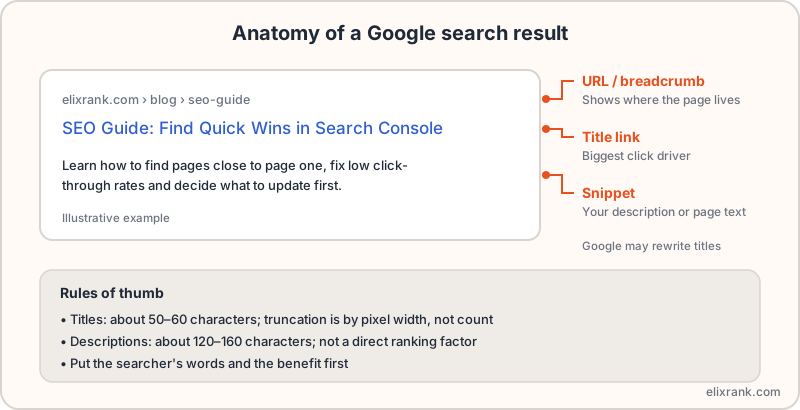
- URL or breadcrumb: shows where the page lives. A clean, readable URL structure helps.
- Title link: the blue clickable line. Usually generated from your title tag, and the biggest single driver of clicks.
- Snippet: the description beneath. Google picks text from your meta description or from the page, whichever it judges more relevant to the query.
Writing the title
- Lead with the words the searcher used.
- Say what the page offers: guide, checklist, tool, price, year.
- Keep it to roughly 50–60 characters. Truncation is by pixel width, so wide letters take more room.
- Make every title unique. Duplicate titles confuse both users and Google.
- Keep it accurate. A misleading title raises clicks briefly and hurts trust.
Preview the result with the meta length checker, which shows the pixel width, and audit a live page with the meta tags analyzer.
Writing the description
A meta description is not a direct ranking factor, but a good one can improve click-through rate. About 120–160 characters is a safe target.
- Open with the benefit or the answer.
- Include the query wording naturally; Google bolds matches.
- End with a reason to click, such as a free tool or a specific outcome.
- Write one per page; don't reuse a template sitewide.
When Google rewrites your snippet
Google often replaces titles and descriptions it finds missing, too long, stuffed with keywords or poorly matched to the query. If your snippet keeps changing:
- Make the title tag match the page's visible H1 and topic.
- Remove keyword repetition and boilerplate such as repeated site names.
- Check that the description actually relates to the page.
Measure the effect
Find pages with plenty of impressions and a CTR below others at a similar position, rewrite their snippets, then compare after 2–4 weeks. The method is in how to improve click-through rate and the numbers are explained in Search Console metrics.
Frequently asked questions
How long should a title tag be?
About 50–60 characters is a common target. Google truncates by pixel width, so there is no exact character limit.
How long should a meta description be?
About 120–160 characters. Longer ones are often cut off.
Does the meta description affect rankings?
Not directly, but it can influence click-through rate.
Why does Google show a different title?
Google may rewrite titles that are missing, too long, keyword-stuffed or not matching the query or page.
Find pages with weak snippets
ElixRank lists pages that get shown but not clicked, from your Search Console data.
Try ElixRank free →