How robots.txt works: rules, examples and common mistakes
By ElixRank Team · Updated
Short answer
robots.txt is a text file at the root of your site that tells crawlers which URLs they may fetch. Each crawler follows the most specific User-agent group that matches it, then the longest matching Allow or Disallow path. It controls crawling, not indexing, so a blocked URL can still appear in search results.
The basics
The file lives at /robots.txt on each host, for example https://example.com/robots.txt. It is made of groups: a User-agent line naming a crawler, followed by Allow and Disallow rules for paths. Compliant crawlers read it before fetching other pages.
How the rules are matched
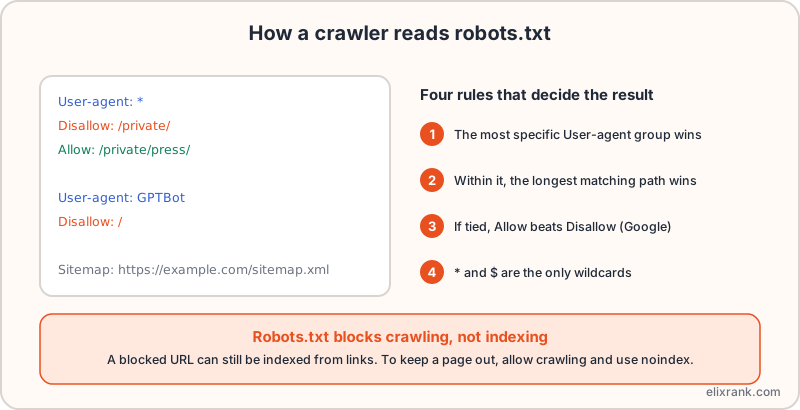
- The crawler picks the group with the most specific User-agent that matches it. A crawler named in its own group ignores the * group.
- Within that group, the rule with the longest matching path wins.
- If an Allow and a Disallow match with equal length, Google uses the less restrictive rule, Allow.
- * matches any sequence of characters and $ marks the end of the URL. Other regex isn't supported.
In the example, /private/press/ is allowed even though /private/ is disallowed, because the Allow path is longer. Test your own file with the robots.txt tester, which applies these rules per crawler.
robots.txt is not noindex
A Disallow stops compliant crawlers fetching a URL. It does not remove the URL from the index: if other sites link to it, it can still appear in results, usually without a description.
- To keep a page out of results, let it be crawled and add a noindex robots meta tag or X-Robots-Tag header.
- If you block the page in robots.txt, crawlers can't see the noindex tag at all.
- For private content, use authentication, not robots.txt.
Check a live page's noindex status, including headers, with the meta tags analyzer.
AI crawlers and robots.txt
Companies publish named crawlers for AI search, training and user-requested fetches, such as GPTBot, OAI-SearchBot, ChatGPT-User, PerplexityBot, ClaudeBot and Google-Extended. You can allow or block each by name. Names and behaviour change, so check each vendor's current documentation.
Common mistakes
- 'Disallow: /' left over from a staging site.
- Blocking CSS or JavaScript that pages need to render.
- Using robots.txt to hide pages that should be noindexed.
- Forgetting that each subdomain has its own file.
- No Sitemap line, so crawlers miss your sitemap. See XML sitemap best practices.
Frequently asked questions
What does robots.txt do?
It tells compliant crawlers which URLs they may or may not fetch on your site.
Does robots.txt stop pages being indexed?
No. It blocks crawling. A blocked URL can still be indexed from links. Use noindex on a crawlable page to keep it out.
Which rule wins, Allow or Disallow?
The longest matching path wins. If equal in length, Google applies Allow.
Should I block AI crawlers?
It depends on whether you want to appear in AI answers. Blocking removes that chance for the crawlers you block.
Test your robots.txt
Check any URL against search and AI crawlers with the free tester.
Try ElixRank free →